

Install product questions
AI-generated preset questions plus a free-form input on a product page. Clicking anything opens the chat overlay with the question pre-filled.
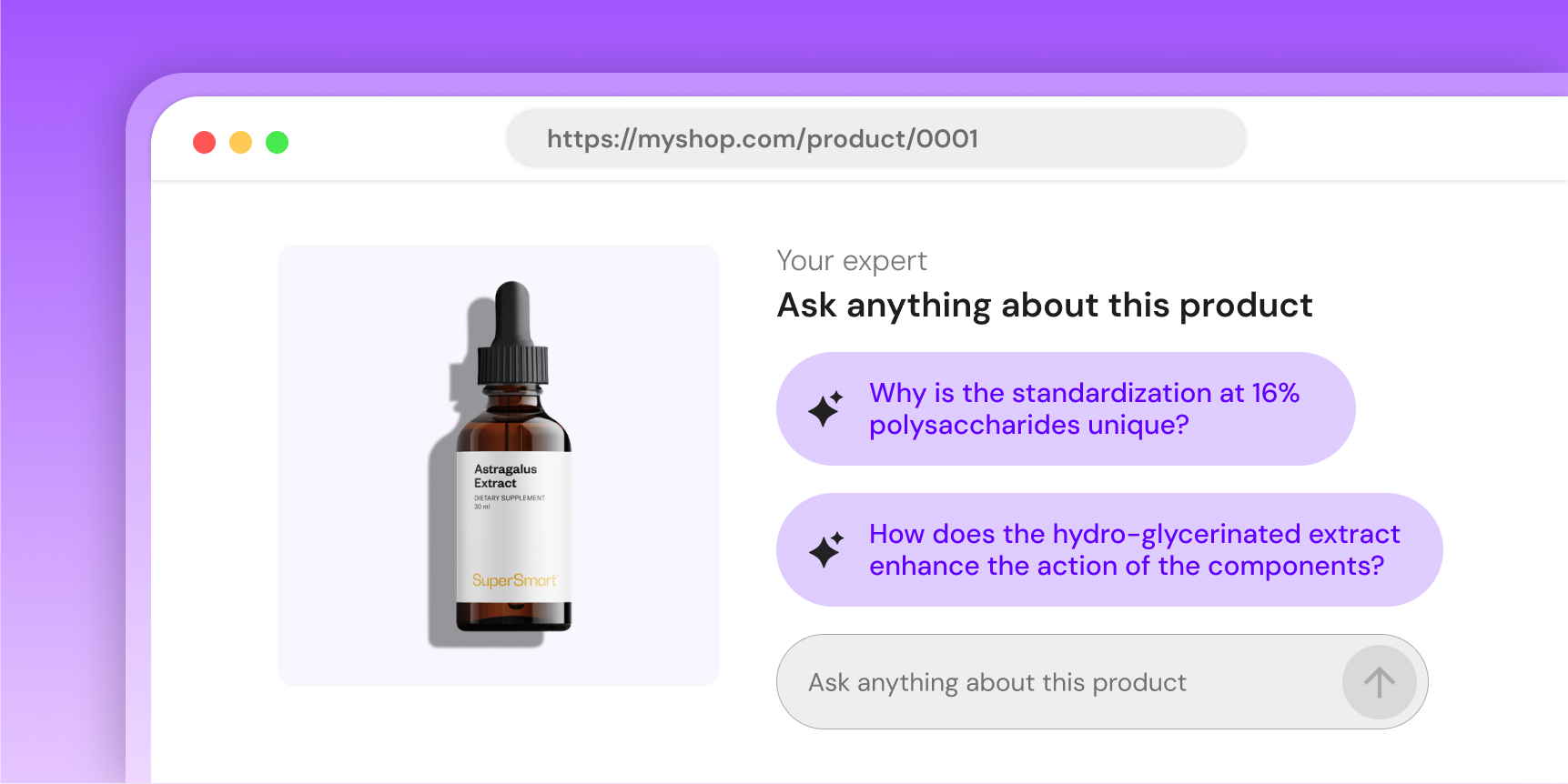
Whitelist your domain first
Humind only renders on domains whitelisted in the URL whitelist page of your dashboard. Add every environment you embed on (prod, staging, preview, etc.).
Preview
product-id="mock" skips the /widgets/product-questions call and loads a hard-coded response.
Shopify theme block
AI Product Q&A: theme app block, available on the product template only. Add it from the theme editor; it auto-injects the current product's GID as product-id="gid://shopify/Product/{{ product.id }}". No HTML to paste. Title, subtitle and placeholder are set in the dashboard (AI > AI Widgets > Product Q&A, "Customize the widget"), per language, not in the theme editor, which keeps the colors and spacing.
Copy-paste
Use these snippets when you're not on pure Shopify (the theme block covers that case).
Shopify backend + custom storefront (headless / hybrid)
Pass the Shopify GID from your storefront code along with your shop domain. The backend resolves the GID to the internal Humind product ID, scoped to your company.
<script src="https://widgets.thehumind.com/v1/loader.js" defer></script>

<humind-product-questions
  product-id="gid://shopify/Product/12345"
  integration="shopify"
  shop-domain="store.myshopify.com"
  language="en"
></humind-product-questions>
Non-Shopify
Use your own product ID. It must match an external ID you previously pushed via the catalog API, otherwise the backend cannot resolve the product and the widget stays hidden.
<humind-product-questions
  product-id="SKU-ABC-123"
  integration="custom"
  company-id="YOUR_COMPANY_ID"
  language="en"
  title="Questions?"
  subtitle="Ask our AI expert"
></humind-product-questions>
company-id is your Humind company ID from the Developer Credentials page. You can pass shop-domain instead if your domain is registered on your Humind company.
Attributes
Required
| Attribute | Type | Purpose |
|---|---|---|
product-id | string | Shopify GID (gid://shopify/Product/12345) or your internal product ID. Pass "mock" for an offline demo. |
Also need one of company-id or shop-domain so the backend can resolve your company.
Identity
| Attribute | Type | Default | Purpose |
|---|---|---|---|
integration | 'shopify' | 'woocommerce' | 'custom' | 'generic' | 'playground' | shopify | Storefront platform. Use custom when the storefront is not Shopify/WooCommerce. Shopify GIDs resolved server-side. |
company-id | string | - | Recommended for non-Shopify merchants. Your Humind company ID from the Developer Credentials page. Takes precedence over shop-domain. |
shop-domain | string | - | Alternative to company-id. Matched against the domains registered on your company (protocol stripped, exact match). Standard choice on Shopify. |
market-key | string | - | Multimarket setups only: names the market when several markets share the same domain (required there, ignored on single-market domains). Set automatically on Shopify. Same behavior as the chat widget: see several markets on one domain. |
language | string | (none) | ISO 639-1 code. Also localizes title, subtitle, and placeholder defaults when those attributes are left blank. Supported: en, fr, de, es, ar, it, nl, pt, ru, zh. |
Display
Leave any of these blank to get the auto-localized version for language. Any explicit value overrides the auto-translation.
| Attribute | Type | Default (en) |
|---|---|---|
title | string | Your Expert |
subtitle | string | Ask anything about this product |
placeholder | string | Ask anything about this product |
show-questions | boolean attr | true |
Colors
| Attribute | Type | Default |
|---|---|---|
color-scheme | 'default' | 'custom' | default |
primary-color | string (hex) | Required when color-scheme="custom" |
text-color | '#000' | '#fff' | #000 |
title-color | string (hex) | #222 |
button-design | 'filled' | 'outlined' | filled |
color-scheme="default" pulls colors from the dashboard config. color-scheme="custom" requires primary-color and uses only the attributes on the tag.
Theming notes
text-coloris a contrast toggle: use#000or#fffonly.button-design:filled: chip background = primary color at 10-20% opacity. Text =text-color.outlined: chip background transparent. Border + text = primary color.
- The widget uses a generic sans-serif stack (
Arial, Helvetica, sans-serif) inside its Shadow DOM. Host fonts don't carry over. Ask support if you need a custom typography pass. - Sizing, spacing, and border-radius are not themable.
Events
When the user clicks a chip or submits the textarea, the widget dispatches humind-open-chat on window with detail { message, productId }:
message: the text of the chip or the content of the textarea.productId: the canonical Humind product ID resolved from the value you passed asproduct-id. Shopify GIDs are mapped server-side.
Mock mode
product-id="mock" loads a hard-coded response with 4 sample questions, with no backend call.
Hidden states
The widget hides itself without error when the backend response is unusable. Common reasons:
- Empty
questions[]array (no questions generated yet). - Unresolved product: the backend could not resolve the
product-idyou passed (wrong GID, unknown external ID, or wrongcompany-id/shop-domain). - Missing
company-idandshop-domain: the backend can't scope the lookup and returns 400. - Missing colors in the response.
Check the network tab on /widgets/product-questions if you expected a render and got nothing.